Showing posts with label Unity. Show all posts

Friday, 17 October 2014

Game Engine: Unity vs Unreal

Which is better for my project?

I have been debating for many months which game engine would be best for my project. My initial decision to use Unity was based on the fact they use it at university but after hearing about other options I have now done some research.Below are the pros and cons of each, some are based from reading and watching online sources, my own observations and general thoughts that relate to my project. The highlighted points are ones that are important to me as the address my situation, my weaknesses and strengths.


Unreal

Pros

  • Quick reply to issues, like fixing bugs.
  • A variety of good example projects
  • An active and helpful online community.
  • Amazing visuals (Compared to Unity)
  • Good documentation online and pop up tutorials if you want to learn more.
  • Key areas, like moving transforms, better than Unity (Seems to be similar to 3ds Max)
  • Ability to ‘play’ the game at any time to see faults (easier and less time-consuming than unity)
  • Everything is open; Epic wants the community to send updates and fixes to help with debugging.
  • More user friendly interface
  • Interface is similar to Photoshop and Adobe products, which is good for me
  • Wizards and plugins – make it easy to create a 1st person shooter without importing characters and objects
  • Less scripting
  • Real-time rendering
  • More successful games created using it e.g. Gears of War, Batman: Arkham City, Bioshock Infinite, Borderlands 2, Mass Effect.
  • Advanced dynamic lighting capabilities
  • New particle system; can handle up to a million particles at 1 time.
  • Use a blueprint system, which is good for designers that aren't strong at coding.
  • I can either get it free as a student or pay just under £12

Cons

  • Unstable on MAC, Windows is better
  • Less streamlined workflow than unity, may take a while for new user to get to grips with.
  • You have to recompile and relaunch if you rebuild your C++ code. It doesn't pick up the changes automatically straightaway.
 

Unity

Pros

  • Good for games for tablets and smartphones
  • Possible to create games for consoles, PS3 and Xbox
  • Good, easy to use plugins.
  • Large asset library
  • Great for 2D games
  • Some popular games created e.g. Slender, Temple Run and Angry Birds
  • Support will be available at University since they teach with the program
  • The Jennison computers have Unity Pro

Cons

  • The graphics aren't as good as unreal.
  • No real modelling or building features
  • The free version doesn't include all the features


Conclusion

After looking at the pros and cons I have decided that I want to use Unreal for my project, I will be talking to my supervisor about my decision to get a second opinion.

Thanks for reading. X

Tuesday, 15 July 2014

Books, Tutorials and Software

Books, Books and More Books

I find books are essential for the work I'm doing. I have so many books on everything from coding to 3D modelling and I'm constantly on the lookout for more decent books.

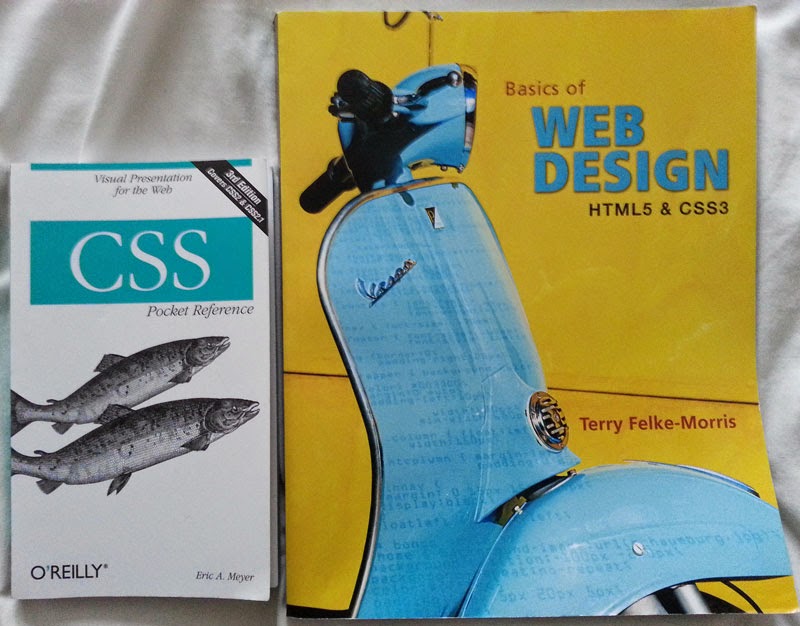
Here are two that are good for familiarizing yourself with HTML or CSS if you have learnt the basics but haven't coded in a while. The one on the right with the yellow cover was suggested to me when I was coding my first website but it's still useful now. The little CSS book is rather helpful, sometimes if I'm going on long journeys I take it with me to have a look through. It's really well laid out with concise information.


The HTML, CSS and JavaScript book, below, has been really handy, the chapters are well organised and everything is explained well. I've been reading a few pages of the Unity one as well, this one also is very interesting, more so because I haven't used Unity in the past.


I love the Sams Teach Yourself range I also have the 3ds Max and Maya ones too which are also really good, it just covers so much, even if you've used the programs a fair amount they'll be something new in there.


I have found some really helpful videos on YouTube that really explain the lines of code that I need for my website, it's just an unlimited supply of information.

I've been watching and reading some tutorials and information on Unity. I will be focusing on this side of the project more in September but I'm just learning a few bits and pieces until then. I've also downloaded the free version on to my laptop. 


Some Tips I've Learnt

In CSS when you are coding something like a margin you only have to write one line of code even if you want to code all the directions, just remember the order 'Top, Right, Bottom, Left'

Like this: -  margin: 0 auto 20px auto;

(Using auto on the left and right margins will center the div)

This also works in other examples like:-

text-shadow: #000000 0px 1.5px; 'Colour, How far right, How far down, How much blur'

padding: 0 10px; 'One figure for Top and Bottom and one figure for Right and Left'

I just think this is really handy to know as it shortens the amount of code you have to write.

Another tip, may be obvious, but it's really important - Optimizing images. Using a program like Photoshop you can use the button 'Save for the web' and select a size, 800-1000 is perfect for larger images but if you don't mind them smaller then even better. By doing this it avoids the images gradually loading after the webpage has, they should load a lot faster. This is important for both websites and blogs.


Thanks for reading. X